
Table of Contents
What you get
- A unique preview URL that you can set that is ready to share with teammates and reviewers
- Real infrastructure in your cloud, created from your deployment policy and build artifacts
- Runtime context variables injected into your app (app ID, environment, run ID, cloud, etc.)
- When a preview is deleted, the Hyphen Agent handles cleanup of cloud resources based on applicable retention policy
Core concepts
Deployment run
A deployment run is the execution of a deployment policy for a specific revision.
Project environments
Projects group apps, environments, and secrets. Environments (like development and production) isolate config and secrets per lifecycle stage.
Deployment policies
Deployment policies define what gets deployed, where it runs, and how it scales. You configure policies in the Hyphen app as part of setup.
Prerequisites
- A cloud provider connected to your Hyphen organization
- A project container registry configured
- Your app initialized with the CLI (
hx init) and the.hxfile committed - At least one deployment policy created
All of the above can be achieved by following the Hyphen Deploy Quickstart
Creating a Deployment Preview
Hyphen supports multiple ways to trigger deployment runs.
Option 1: Use the CLI
Hyphen Deployment Previews let you create isolated environments for branches, pull requests, or temporary testing.
Using the CLI, you can:
- Build an artifact associated with a preview
- Deploy that build to a preview environment
- Reuse an existing build for future deployments
Step 1: Build with a Preview Label
Use the --preview flag when building to associate the build with a preview name.
hx build --preview
Example
hyphen build --preview "PR-200"
This command:
- Builds your application
- Uploads the artifact to your artifact registry
- Tags the build with the preview name
📘 **Important **
📘 This step does not create the preview environment yet.
📘 The preview name is stored with the build so it can be used later during deployment.
📘 Builds tagged with a preview can be deployed to your production deployment.
Step 2: Create a Deployment Preview
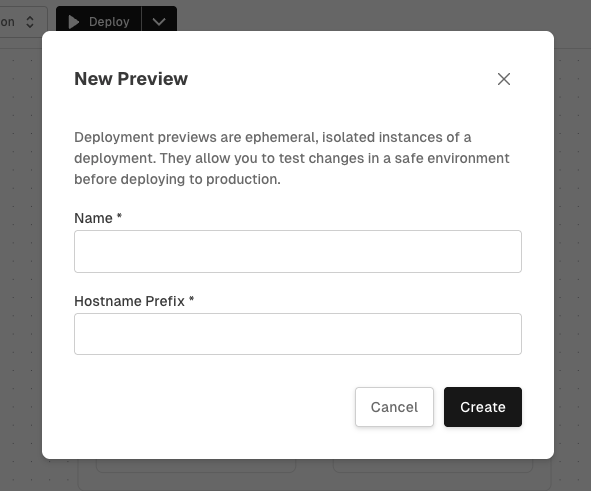
To create a preview, you must give the preview a name and a host prefix. The prefix gets pre-pended to the deployments existing hostname.
hx deploy --preview --prefix
Example
hx deploy deploy-to-dev --preview "PR-200" --prefix pr200
Example preview url would be: https://pr200-my-app.demo.com
Hyphen will:
- Create the preview
- Look for builds associated with that preview
- Start a deployment run
Step 3: Reuse an Existing Build
If a build already exists for the preview, you can skip building again using --no-build.
hx deploy deploy-to-dev --preview "PR-200" --no-build
Option 2: In the Hyphen App
To create deployment previews in the Hyphen app:
-
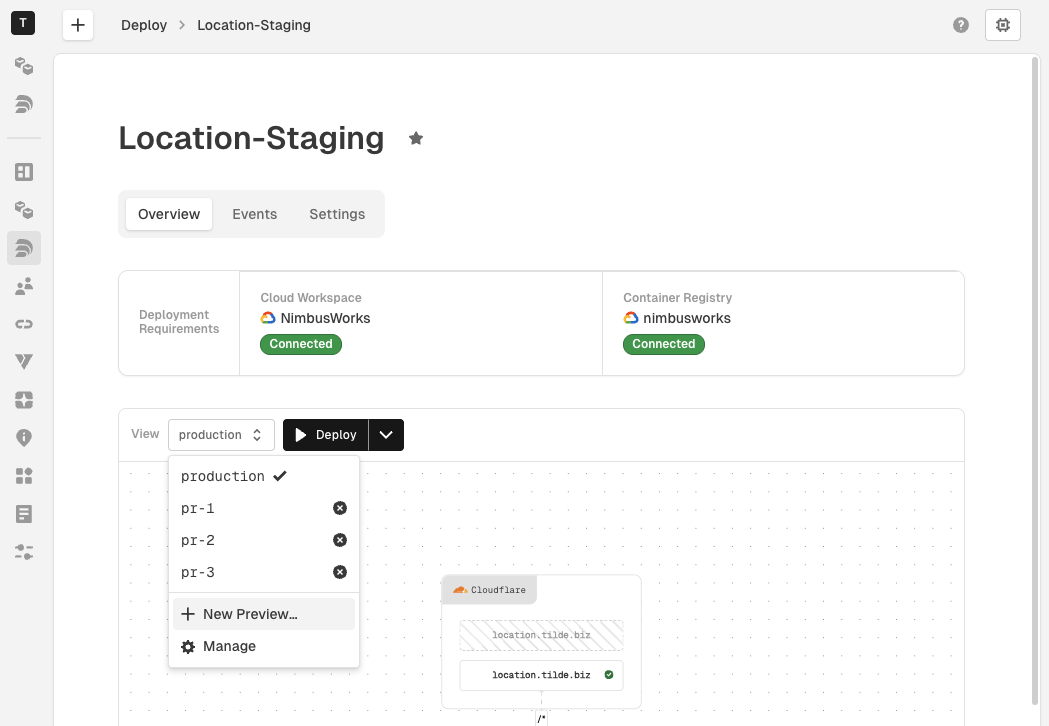
Navigate to Deploy → then choose the policy you want to create a preview for.
-
Open the dropdown menu labeled production, then select New Preview...
-
Give your new preview a name and host prefix and select Create
-
You're new deployment preview is now selected and ready to be deployed. Click the Deploy Preview button, which will take you to a list of app builds that are available to deployed.
-
Select the build to deploy and your deployment run will begin.